Public Beta available — Aug 31, 2026

Your GitHub Classroom replacement.

A local-first desktop app that helps instructors Provision and Release GitHub repositories for their students — no external service required.

GitHub Classroom is gone. Now what?

GitHub Classroom launched in July 2013 and was sunset in August 2026, leaving instructors and schools scrambling for alternatives — with the official recommendation being to move to yet another online service.

CodeHub Classroom takes a different path. Rather than depend on an external service to create and manage your classroom assignments, you manage them locally, on your own computer.

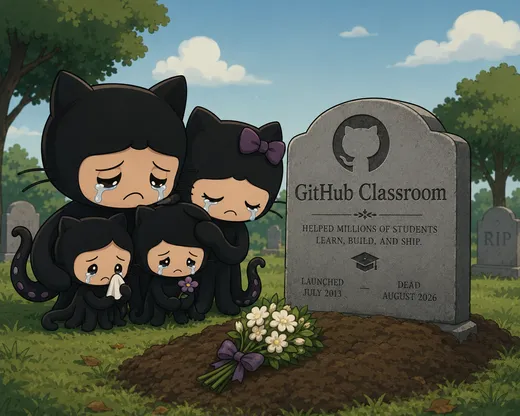
Farewell, GitHub Classroom (2013–2026)

How CodeHub Classroom is different

Built around your school term

GitHub Classroom made you manage a separate classroom for every course section. CodeHub Classroom shows every course and section you're teaching this term in one dashboard — no more duplicate data entry for assignments and rosters shared across sections.
Runs on your computer, not ours

CodeHub Classroom is a desktop app with no backend, no GitHub App, and no shared service account to rate-limit. It simply drives the git and GitHub CLI (gh) tools you likely already have installed.

Two steps, entirely under your control

1

Provision

Generate each student's private repository from your assignment template. No one has access yet.

2

Release

Invite each student as a collaborator on their own repository, exactly when you're ready.

It closely follows the same flow GitHub Classroom used to have — minus the dependency on GitHub's own service.

See it in action

CodeHub Classroom dashboard showing courses, sections, and assignments for a school term
Every classroom for your school term, in one dashboard.
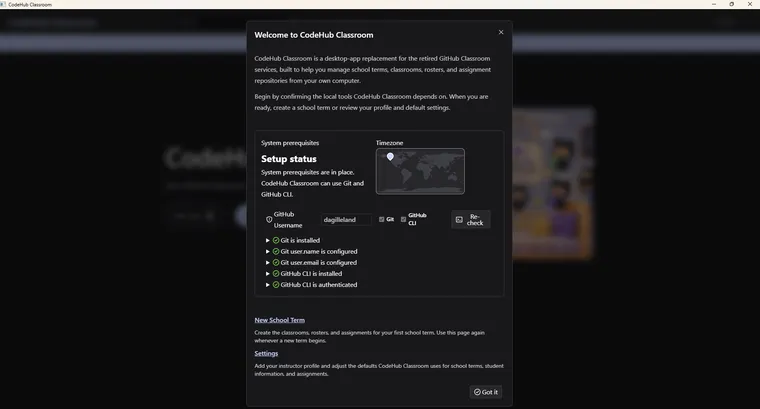
CodeHub Classroom's onboarding dialog, checking system prerequisites before first use
A guided first launch — CodeHub checks your setup before you start.

Built to be trusted with your work

Pricing

Free.

CodeHub Classroom is free to use. A one-time-purchase Pro/Plus edition is planned down the road (in the tradition of Beyond Compare) — never a subscription.

Frequently asked questions

Who is this for?
Anyone who uses GitHub as the central place to distribute and collect Git repositories for their students.
Is it secure? Do you see my Git or GitHub credentials?
No. CodeHub Classroom never sees or stores your Git or GitHub credentials — it runs git and gh using your own local login, and explicitly avoids the --show-token flag.
Is CodeHub Classroom free?
Yes. A one-time-purchase Pro/Plus edition is planned for the future, but the core app is free — never a subscription.
Is it open source?
Not yet. The code is closed source for now, while the architecture settles.
How will I know when a new beta build is out?
Watch the GitHub repository and choose Custom → Releases — GitHub will email you whenever a new beta build is posted. Starring the repo also helps other instructors find the project while GitHub Classroom winds down.

Install the Windows beta

The beta isn't code-signed yet, so getting it running is a short manual process — about two minutes, Windows only for now. On first launch, CodeHub checks for git and the GitHub CLI (gh).

1

Download

Open the GitHub releases page and download the codehub-<version>-beta.zip asset from the newest release, at the top of the list.

Download from GitHub
2

Unblock the ZIP

Right-click the downloaded .zip and choose Properties, tick Unblock near the bottom, then OK. Do this before extracting, so Windows doesn't flag every file inside.

3

Unzip

Right-click the .zip and choose Extract All… into a folder you'll keep it in — not left inside Downloads. Keep the extracted files together.

4

Run

Open the extracted folder and double-click codehub-Setup-canary.exe. It unpacks CodeHub Classroom and launches it. Keep that .exe next to its .installer folder when you run it.

5

Firewall Alert

You might get a Firewall alert when you launch after the first installation (not on upgrades). You can safely Cancel that and proceed.

What to doClick Cancel. This app uses Bun under the hood, but it doesn't need you to open a door in your firewall.

Illustration only — a mock-up of a real Windows system prompt, shown here so you know what to expect.

If Windows SmartScreen shows “Windows protected your PC”, click More info then Run anyway — the beta isn't signed yet. To update later, download the newer ZIP and repeat these steps — Watch the repo so you know when a new build lands.

Star and Watch the repo

Ready for your next school term?

The public beta is here — download it and get your next school term set up.

Get the Beta